April 16, 2026 by Slint Developers
Slint 1.16 Released 
We're back from Embedded World 2026 in Nürnberg, recharged and excited to announce Slint 1.16. In this release, we've added keyboard shortcuts, styled text with Markdown support, and multi-touch gesture handling.
Keyboard Shortcuts
Handling keyboard shortcuts used to require listening for key events and manually matching key combinations.
With 1.16, we've added a dedicated KeyBinding element that makes this much simpler.
Define shortcuts declaratively in your .slint markup using the new @keys(...) macro:
export component MyApp inherits Window {
    FocusScope {
        KeyBinding {
            keys: @keys(Control+S);
            activated => {
                debug("... save your document ...");
            }
        }
        // ... rest of the UI goes there
    }
}
Menus also benefit from this: use the shortcut property on menu items to associate a keyboard shortcut that's displayed alongside the menu entry.
For the full details, see the key bindings documentation.
Styled Text with Markdown
Rich text has been one of our most requested features.
In this release, we're introducing the StyledText element along with a new styled-text type and the @markdown(...) macro.
Use them to render formatted text directly in your UI:
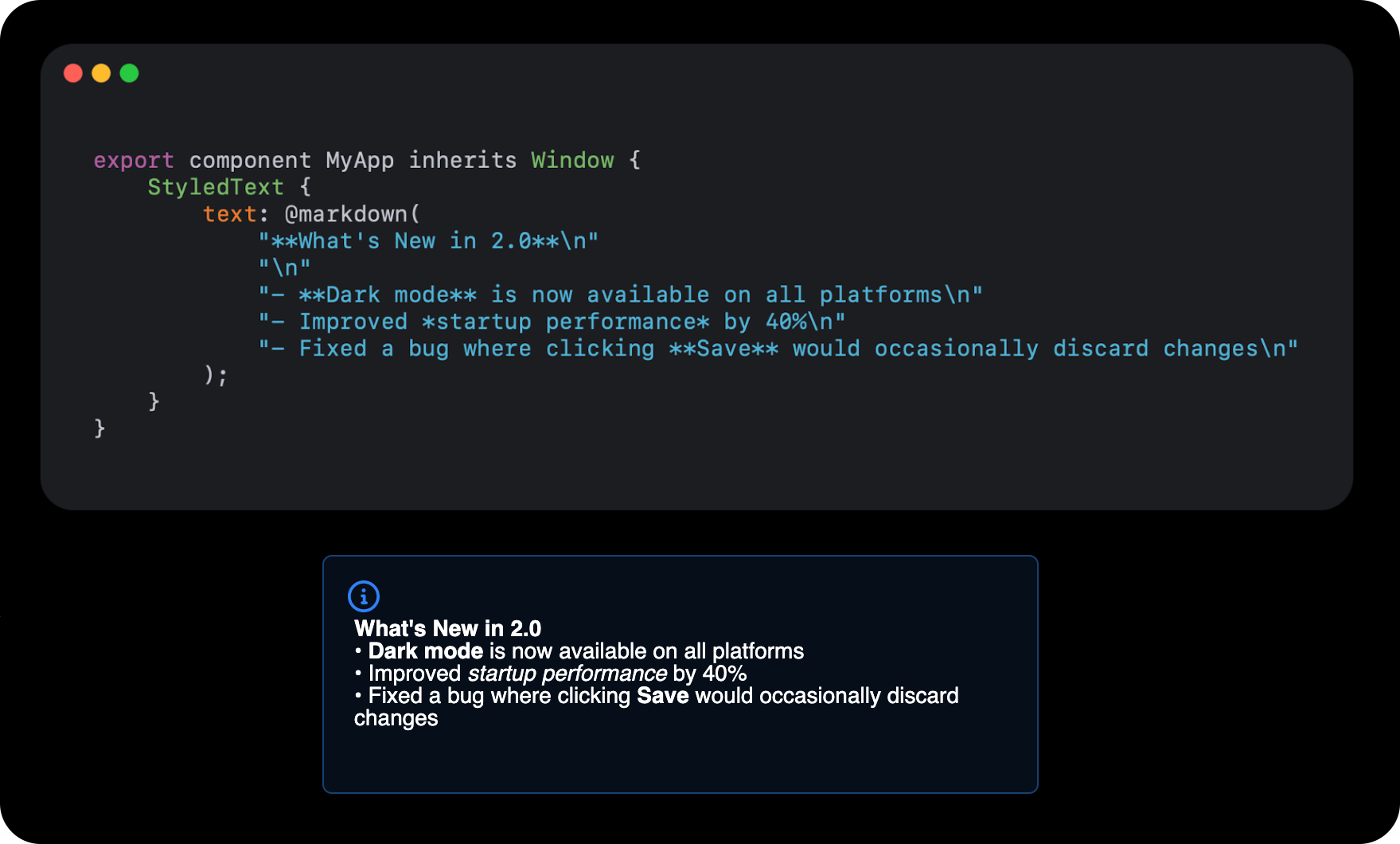
This is a first step toward full rich text support, and we're looking forward to your feedback on how you'd like to use it.
Work on both keyboard shortcuts and StyledText is being funded by NLnet. We're very grateful for their support.
Multi-Touch Gesture Handling
Build pinch-to-zoom and rotate interactions with the new ScaleRotateGestureHandler element, contributed by Till Adam.
It handles multi-touch pinch gestures out of the box,
making it straightforward to add touch-friendly interactions to your app on mobile and embedded devices.
Other Changes
Here are a few more improvements in this release:
- Fluent is now the default style on all platforms -- see this blog post for details.
- Improved text rendering: swash now handles glyph rasterization in the FemtoVG and Software renderers, the Skia renderer uses subpixel glyph positioning for even spacing, and WASM builds use the modern Inter font instead of DejaVu.
- New
FemtoVGWGPURendererfor embedding Slint into existing WGPU-driven applications, such as games built with Bevy. - Added
slint.languagepackage for Python andslint::languagenamespace for C++ to hold enums and structs from the Slint language. Flickablenow starts capturing scroll events after the first scroll and has improved animations.TouchAreafixed mouse cursor when going from oneTouchAreato another.- Use
Path.fitto control how a path's view box scales to fit the element's dimensions -- similar to howImage.image-fitworks for images. @image-urlnow acceptsdata:URLs, making it easier to embed images inline.ComboBox: Fixed scrolling to selected item and popup closing on scrollbar interaction.- The software renderer now supports
Pathrendering inno_stdenvironments via thesoftware-renderer-pathfeature. - LinuxKMS now supports WGPU-based rendering with Skia and FemtoVG, for embedded Linux setups running without a windowing system.
For a complete list of all changes, check out the full ChangeLog.
What We're Working On
We're also busy on a few bigger things that aren't quite done yet. You can already try them out as experimental features, but be aware that the API may still change before we call them stable, so we'd love to hear your feedback. Have a look at the experimental features documentation to see the full list and how to turn them on.
- FlexboxLayout -- A new layout primitive alongside
HorizontalLayout,VerticalLayout, andGridLayout, powered by the popular taffy crate. If you're coming from the web, this will feel familiar. Items automatically wrap to the next line when they don't fit, and you get fine-grained control over direction, alignment, and spacing. Thanks to David Faure for this major contribution. - Drag and Drop -- Native drag-and-drop support between elements.
- Interface -- A new language construct that describes the shape of a component, making it much easier to build custom styles for widgets.
- Library modules -- Bundle Slint code together with Rust code in a single reusable library.
Getting Started with Slint 1.16
- New to Slint? Start here: Get Started
- Upgrading? Follow the steps on our GitHub release page
- Browse the latest docs at https://docs.slint.dev
Don't forget to star us on GitHub, join our Mattermost chat, and share your projects.
Thanks
Big thanks to everyone who contributed code, fixes, or feedback. You help us make Slint better with every release.
@0x6e @amirHdev @bennysj @benoit-canet @ChisomUma @DataTriny @dfaure-kdab @eupn @Guiguiprim @jbinasvvd @kaganege @lzm-build @marcothaller @Montel @nicoburns @npwoods @QuentinLeeWeber @sandreas @task-jp @tilladam @uAtomicBoolean @ubruhin @wuwbobo2021
Slint is a Rust-based toolkit for creating reactive and fluent user interfaces across a range of targets, from embedded devices with limited resources to powerful mobile devices and desktop machines. Supporting Android, Windows, Mac, Linux, and bare-metal systems, Slint features an easy-to-learn domain-specific language (DSL) that compiles into native code, optimizing for the target device's capabilities. It facilitates collaboration between designers and developers on shared projects and supports business logic development in Rust, C++, JavaScript, or Python.