February 4, 2026 by Slint Developers
Slint 1.15 Released 
Fresh off the back of our company meeting in Berlin, we're proud to announce our first release of 2026: Slint 1.15. In this release, we're making layouts easier with dynamic grids, enabling two-way bindings on structs, adding type hints for Python via the slint-compiler, and improving the Android and iOS ports with safe area and virtual keyboard area support.
Refreshed Demos
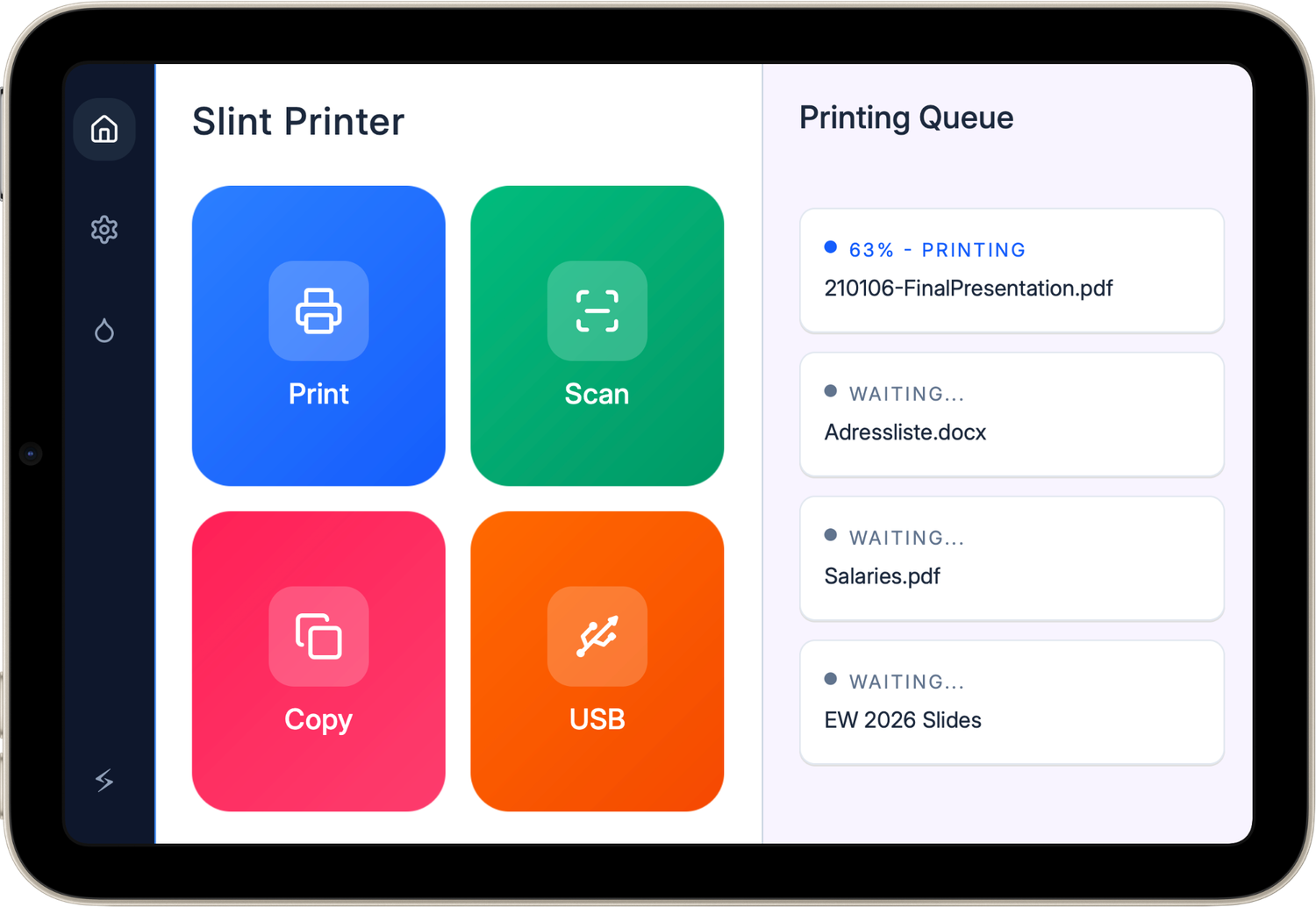
Embedded World 2026 in Nürnberg is just weeks away on March 10th (btw, come see us in Hall 4 at booth 4-300). To prepare, we've polished several demos and are cooking up some new ones. Today, the spotlight is on the refreshed printer demo:
Live-Preview Improvements
Part of the magic of Slint is the live-preview showing your changes instantly. However, we've had some tricky bugs that resulted in the preview sometimes being out of date. Leon, our newest team member, dived right in and fixed these issues.
Dynamic GridLayout
Up until this release, GridLayout was rather basic and static. Thanks to major contributions by David Faure, grid layouts are now fully dynamic:
- Scale grids by using
forloops for rows and within rows. - Set arbitrary bindings for the
colandrowproperties to place cells. - Show and hide cells with the familiar
if.
This makes it easy to build data driven tables, such as this example:
    GridLayout {
        Row {
            HeaderCell {
                cell_text: "Name";
            }
            HeaderCell {
                cell_text: "Account";
            }
            HeaderCell {
                cell_text: "Animal";
            }
        }
        for person in model: Row {
            Cell {
                cell_text: person.name;
            }
            Cell {
                cell_text: person.account;
            }
            Cell {
                cell_text: person.animal;
            }
        }
    }
Here's another example from our refreshed printer demo, where the cell placement is computed:
    GridLayout {
        spacing: 16px;

        for action[index] in actions: ActionButton {
            col: index.mod(2);
            row: index / 2;
            icon: action.icon;
            text: action.name;
        }
    }
Two-way bindings on struct fields
Two-way bindings are a powerful mechanism to implement bi-directional flow of data. In this release, we've extended our implementation so that they can be used on struct fields:
struct FooData { title: string, value: float}
export component Foo {
    in-out property <FooData> data;
    VerticalLayout {
        LineEdit {
            text <=> data.title;
        }

        Slider {
            value <=> data.value;
        }
    }
}
Type Hinting for Python
Python is a dynamically typed programming language, where type hints can be added and checked with additional tools such as mypy or ty. In this release, we've added type hinting for Python to the slint compiler. This also comes
with a more convenient way of loading .slint files in Python:
# Grab slint-compiler from pypi.org and generate `app_window.py`
uvx slint-compiler -f python -o app_window.py app_window.slint
Import the file in your Python code to load and access the Slint UI and get coverage for Python static type checkers,
such as mypy or ty.
import slint
import app_window

app_window = app_window.AppWindow()
app_window.counterr = 42 # oops! this property has a different name
The type checker will find this before running the code:
uv run ty check
When importing the generated .py file at run-time, Slint will verify that your API is still compatible.
Slint on iOS and Android
This release adds supports for the safe and virtual keyboard areas on iOS and Android:
- Adjust the position of user-accessible elements with the safe-area-insets property.
- Similarly, the location and size of the virtual keyboard is exposed with virtual-keyboard-position and virtual-keyboard-size.
We've also updated our getting started guides on iOS and on Android.
🛠️ Other Changes
Here are a few more things we added:
- The software renderer now supports
Pathrendering (except when usingno_stdor freestanding builds). - Fixed a
BorrowMutErrorpanic with the software renderer. - Added
Colors.oklch()and.to-oklch()functions. - When resizing the window, try to keep the focus item visible if it's in a
Flickable. - When focusing an element that's not fully visible, try to scroll a parent
Flickableso that it is. - Text and images are now rendered at pixel boundaries.
- Updated to WGPU 28 and drop WGPU 26.
For a complete list of all changes, check out the full ChangeLog.
🚀 Getting Started with Slint 1.15
- New to Slint? Start here: Get Started
- Upgrading? Follow the steps on our GitHub release page
- Browse the latest docs at https://docs.slint.dev
Don’t forget to star us on GitHub, join our Mattermost chat, and share your projects.
🌟 Thanks
Big thanks to everyone who contributed code, fixes, or feedback. You help us make Slint better with every release.
@0x6e @6he @Apollo-Roboto @bjorn @Cdmium @cnlancehu @DataTriny @dfaure-kdab @GreyElaina @jturcotte @kbalt @kristof-mattei @MAlba124 @manuel-plavsic @marcothaller @mccakit @Montel @nanopink @npwoods @peter-lyons-kehl @pierrefreire @R-Cramer4 @redstrate @RinLovesYou @sandreas @stellar-aria @steveire @taichi765 @taoistwar @task-jp @tilladam @ubruhin @VimYoung @Yappaholic
Finally, heartfelt thanks to NLnet for their continued support of Slint’s development.
Slint is a Rust-based toolkit for creating reactive and fluent user interfaces across a range of targets, from embedded devices with limited resources to powerful mobile devices and desktop machines. Supporting Android, Windows, Mac, Linux, and bare-metal systems, Slint features an easy-to-learn domain-specific language (DSL) that compiles into native code, optimizing for the target device's capabilities. It facilitates collaboration between designers and developers on shared projects and supports business logic development in Rust, C++, JavaScript, or Python.